
SMS / WhatsApp / Email Notification
Enabling auto-sending of SMS & Email to customer on New Sales:
- First, setup the Email SMTP and/or SMS details in Business settings.
- Go to Notification Template
- Under Customer Notification you will see New Sales notification.
- There you will find the option to enable &
- Now when ever you make a sales a Email or SMS notification will be send to customer.
Important NOTE:
- If there is any error in Email or SMS configration then sales will not get submitted, so test it properly.
- Email notification will only get send in case the customer have a valid email present
- Similary SMS will only get send if the mobile number is present.
Enabling auto-sending of Whatsapp Notification on New Sale:
To enable automatic WhatsApp notifications, enable the ‘Auto send Whatsapp Notification‘ check box under Customer Notification > New Sale.
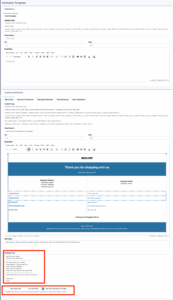
Sample Notification Templates
SMS
Dear {contact_name}, Invoice No: {invoice_number}, Total Amount: {total_amount}.00\nThank You For Choosing Us
Dear {contact_name},
Thank you for choosing us
——————————
Invoice No: {invoice_number}
Total Amount: {total_amount}
Total Paid: {paid_amount}
Invoice Due: {due_amount}
Total Credit: {cumulative_due_amount}
——————————
Click below link to view your invoice {invoice_url}
*Thank You*
Still stuck? How can we help?
Last updated:
Was this article helpful to you?