
This setting allows NEXA ERP to generate a daily/session-based KOT Ticket Number for restaurant orders.
The ticket number will reset based on the cash register open and close session.
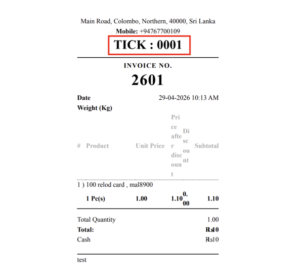
Example:
Invoice No: 2601
Ticket No: 0001
When a new cash register session starts, the ticket number will start again from the configured starting number.
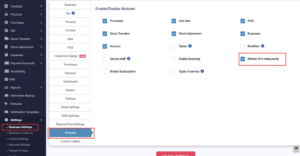
Step 1: Enable Kitchen Module
Go to: Settings → Business Settings → Modules
Enable: Kitchen (For restaurants)
Then click: Update Settings
This will activate the Kitchen/KOT-related options in the system.
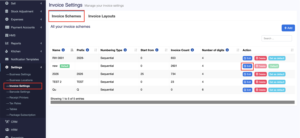
Step 2: Open Invoice Settings
Go to: Settings → Invoice Settings
Then open: Invoice Schemes
Find the invoice scheme you are using and click: Edit
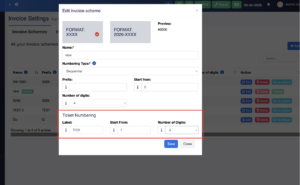
Step 3: Configure Ticket Numbering
Inside the Edit Invoice Scheme popup, find the section: Ticket Numbering
After entering the details, click: Save
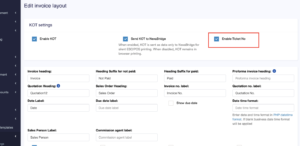
Step 4: Enable Ticket No in Invoice Layout
Go to: Settings → Invoice Settings → Invoice Layouts
Edit the invoice layout used for restaurant/KOT billing.
Then enable: Enable Ticket No
Click: Save
Step 5: Open Cash Register
Before making sales, open the cash register.
The ticket number will start from the configured value.
Example: 0001
Step 6: Ticket Number Reset
When the cash register is closed and a new cash register session is opened, the ticket number will reset again.