
The Product Stock History feature allows you to view detailed records of all stock-related transactions for a specific product, including:
- Sales
- Purchases
- Opening Stock
- Transferred Stock
- Stock Adjustments
You can also filter the history by date range to analyze stock movement over a specific period.
How to View Product Stock History
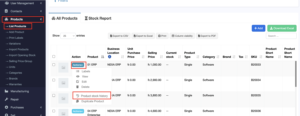
- Go to Products → Product List
- Click on the Actions dropdown for the desired product
- Select Product Stock History
This helps in tracking product-level inventory changes and resolving stock-related discrepancies efficiently.