
Any contact can be supplier, Customer
Adding Suppliers & Customers
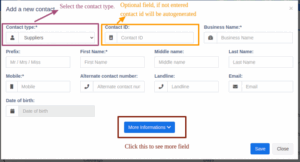
Opening Balance is Only for Customers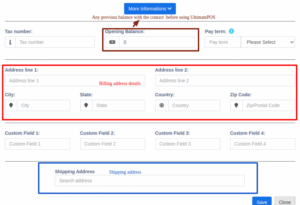
- Goto Contacts -> Suppliers or Customer
- Click on add new contact. Select contact type – Supplier/Customer
- Based on the contact type selected – it will show the relevant fields. Fill the relevant details.
- Click on More More Information button to see more field.
- Pay Terms: This will help the system to notify you of any pending payments for suppliers & customers. You can specify pay term in either days or months.
- Customer Group: Read details here.
- Credit Limit: This is the maximum amount of credit that can be given to the customer. If in any sales the credit exceeds this amount then it won’t allow selling on credit.
- Opening Balance: Opening balance of a customer before you start using NEXA ERP. So if there is any previous balance you can add here.
- Advance balance: Sometimes customer pay money in advance. This wil show the amount of advance balance paid or take by the customer respectively.
Viewing Suppliers & Customers
- To view details about a Supplier or Customer click on View button. It will show the complete details along with the relevant transactions (Purchases & Sales) for that contact.
- Pay Due amount: You can use this button to pay the due amount for a customer or supplier. This will pay the overall due amount for all invoices.
Changing default customer name
If you want to change the default customer name “walk-in-customer” to something else follow the steps below.
Note: You cannot edit or change the default customer’s details.
Credit Limit for Customer
- Credit limits can be added to customers.
- When the credit limit is reached the partial or credit sale can’t be sone for those customers.
- To set the credit limit Go to Contacts > Customers > Action > Edit > More Information > Credit Limit.
- Set this field blank for not having any credit limit for customers.
NOTE: Do not set the credit limit as 0 for having no credit limit.
Credit Limit = 0 (the credit for the customer is 0)
Credit Limit = blank (no restriction for credit limit(infinite))