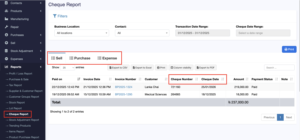
The Cheque Report in NEXA provides a centralized view of all cheque-based transactions across Sales, Purchases, and Expenses.
It helps administrators track cheque details, payment status, and totals with precision.
Purpose of the Cheque Report
This report is designed to:
- Monitor cheque payments in one place
- Track post-dated and cleared cheques
- Reconcile cheque payments against invoices
- Support auditing, finance review, and reporting
Only users with report access permissions can view this module.
Filters (Top Section)
You can narrow down the report using these options:
- Business Location: Choose a branch or view all branches.
- Contact: Select a customer or supplier, or keep All.
- Transaction Date Range: Filters by the date the payment was entered into the system.
- Cheque Date Range: Filters by the date written on the cheque (useful for post-dated cheques).
Report Tabs
The report is split into three sections:
- Sell – Cheques received from customers
- Purchase – Cheques given to suppliers
- Expense – Cheques used to pay expenses
Click a tab to see only that type of cheque payment.
What Each Column Means
- Paid On – When the cheque payment was recorded
- Date – Date of the related invoice
- Reference No – Invoice/Purchase/Enpense reference number
- Customer – Customer or supplier name
- Cheque Number – Number printed on the cheque
- Cheque Date – Date written on the cheque
- Amount – Cheque amount
- Payment Status – Shows whether the Invoice is paid or pending
- Note – Any extra comments
Total Amount
At the bottom of the table, NEXA shows the total cheque amount for the selected filters and tab.