
The “Same Barcode Delay” setting controls how long the scanner waits before it can scan the same barcode again.
This helps stop accidental double scans.
Download: Barcode Scanner delay setting-XB-8602
Steps to Set Delay on XB-8602
- Connect the scanner
- Plug it into your computer or POS system using USB.
- Open the delay setting page
- Use the sheet titled “Barcode Scanner delay setting – XB-8602” (you already have this PDF).
- Choose a delay time
- Options are:
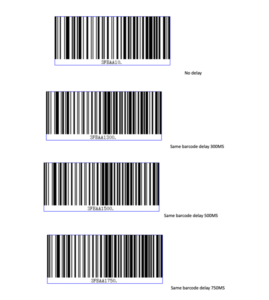
- No Delay
- 300 ms (0.3 seconds)
- 500 ms (0.5 seconds)
- 750 ms (0.75 seconds)
- 1 s
- 2 s
- 3 s
- Options are:
- Scan the barcode
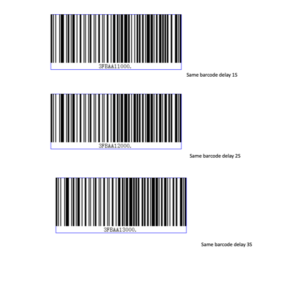
- Simply scan the barcode for your chosen delay from the sheet.
- Example: Scan “Same barcode delay 1S” if you want a 1-second delay.
- The scanner will beep to confirm the setting.
- Test
- Scan the same barcode twice.
- If it ignores the second scan (within your chosen delay time), it’s working!
To Change or Reset
- Scan a different delay barcode to change it.
- To remove delay completely, scan the “No Delay” barcode.